macOS plugin · AU, VST3 and Standalone Version 1.3.1
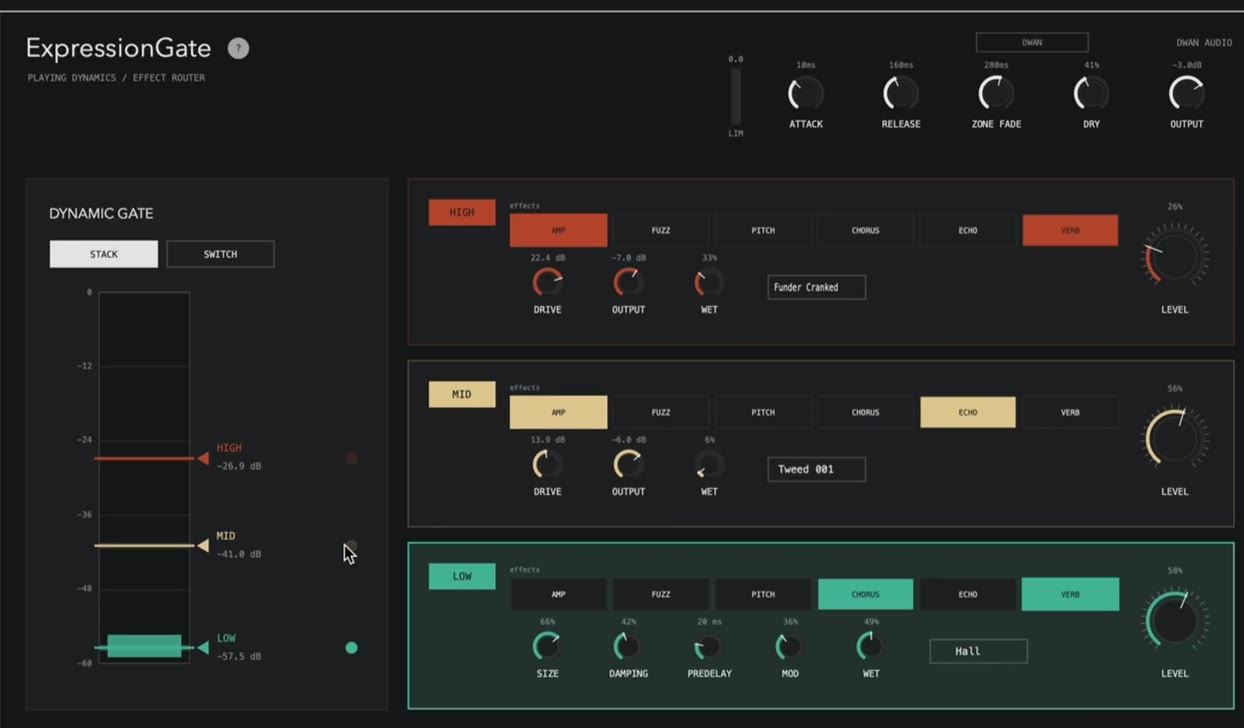
An effects plugin you control by how loud you play. Quiet playing gives you one set of effects, playing harder gives you another, and digging in gives you a third. You set the three volume levels yourself and pick what each one does, so the sound changes without you touching a pedal.
Demo
Nothing is switched by hand in this clip. The playing just gets gradually louder, and the sound changes on its own each time it passes one of the three levels. By the end it has arrived at heavy distortion with a big reverb behind it. Sound on.
The idea
You drag three markers onto the input meter to set the volume levels. Each level has its own set of six effects. How hard you play decides which set you hear.
Quiet playing. For the effect that should always be there, or nothing at all if you want it clean until you dig in.
Normal playing. Crossed constantly, so this is the sound under your hands most of the time.
Accents. Only crossed when you hit hard, so the big effects stay occasional.
Signal chain
Every zone runs the same six effects in the same serial order. Each has its own power switch and Wet blend, so an effect can be dialled back inside a zone without touching the global Dry. Slots stay compact until you hover them.
Requirements
Download
Open the .pkg and follow the installer. It puts the Audio Unit in /Library/Audio/Plug-Ins/Components, the VST3 in /Library/Audio/Plug-Ins/VST3, and the standalone app in /Applications. Restart your host afterwards so it rescans plugins. Logic Pro caches its plugin list, so it needs a full restart.
The installer is signed with a Developer ID certificate and notarised by Apple, so macOS opens it without a Gatekeeper warning. If you already have an older version, this one replaces it. Nothing to remove first.
The zone design is still being tuned by playing it. If you try it, what is most useful back is whether the three levels land where your playing actually sits, and whether the effect ranges are usable at the extremes. Tell me.