macOS app Version 1.3.0
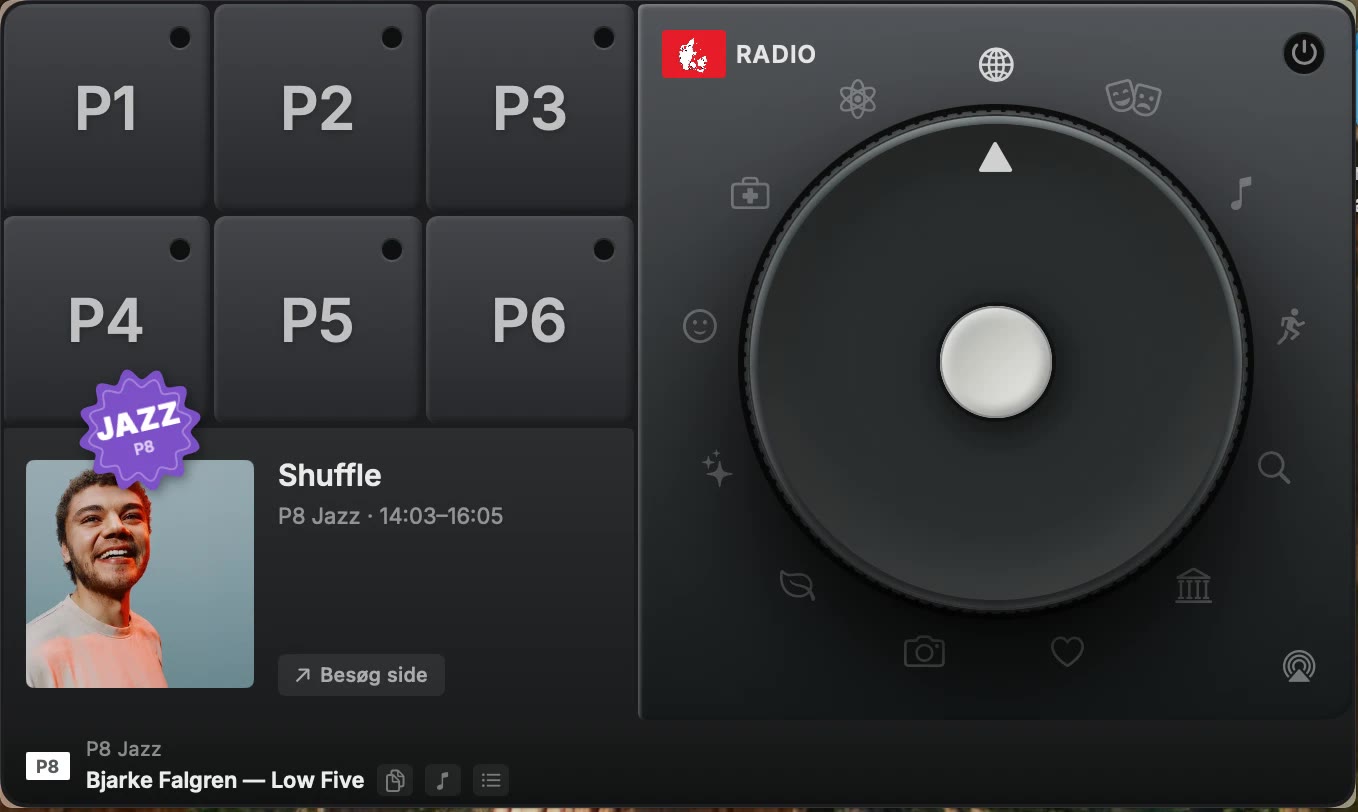
Danish radio as a physical panel in the menu bar. Six pads for the national stations, a sticker for the jazz channel, and a dial that reaches into the archive. Press a pad, the station plays. Press it again, it stops. That is the whole interaction.
Demo
Number keys switch stations, the dial goes hunting through the archive, and the bottom row keeps up with whatever is playing. Watch the theme icons: the one that is running lights up while the rest stay dim. Sound on.
How it works
Listening to the radio online usually means a website, a cookie banner and a player that stops when you close the tab. DK Dial is six pads and a dial that live in the menu bar, so the radio is one keystroke away and stays out of your Dock.
Number keys 1 to 6 toggle the six main stations and
8 the jazz one, so you can change station without looking. The regional
stations are on a right-click: pick your region once and both regional pads follow it.
.m3u files in the app folder, one per channel, including all ten regional variants.1–6 for the main stations, 8 for jazz, ⌘Q to quit.The dial
The dial is for when you do not want live radio. Turn it to one of thirteen archive themes — news, culture, crime, history and the rest — and it finds the series in that category with the most recent episode and plays it.
Press the same theme again and it moves on to the next series. It remembers what it last played across every theme, so two neighbouring themes do not hand you the same programme twice.
The theme icons around the dial double as the playback lamp. The one that is running lights white, breathes while its episode is being fetched, and turns red if it cannot be. The rest sit at thirty percent, so the lit one reads as lit rather than merely brighter.
Honestly
The broadcaster publishes none of this for third parties to use, so DK Dial reads what a browser would read. That works, and it can stop working the day anything is rearranged. Three parts are exposed: the archive lookup, which reads the page data behind the listening site; the playlist feed, which needs a key that sits in the site's own public JavaScript; and the channel numbers inside the stream addresses.
Each fails in a contained way rather than taking the app down. If the playlist feed stops answering, the track name falls back to what the audio stream itself carries. If the key changes, that button disappears cleanly and everything else keeps working.
This is a personal project and is not affiliated with, endorsed by, or connected to any broadcaster. Station names, logos and colours belong to their owners.
Origin
The look of the panel, the dial and the sound feedback come from NTS Dial by sennabecool, a menu bar radio for NTS. Everything about the stations, the programme data and the playback was rewritten for Danish radio, but the shape of the thing is theirs.
The typeface is Inter under the SIL Open Font License; the licence ships inside the app.
Download
Open the disk image and drag DK Dial to Applications. It is signed with a Developer ID certificate and notarised by Apple, with the ticket stapled to the app, so it opens without a Gatekeeper warning even on a machine that is offline.
It runs in the menu bar with no Dock icon. Click the icon for the panel. The first time you open it the panel shows itself, since an app with no Dock icon and no window otherwise looks like nothing happened.
1.3.0 moves quitting to the lamp in the dial's corner, turns the theme icons into the playback indicator, and drops the white plate the app icon was sitting on.